Tools & Workflows | 12 min read
Published | Updated
AI SOPs for Small Business: How to Turn Repeated Work Into Safe, Repeatable Workflows
AI SOPs help owners, employees, and managers turn repeated tasks into clear prompts, review steps, and reusable team workflows.
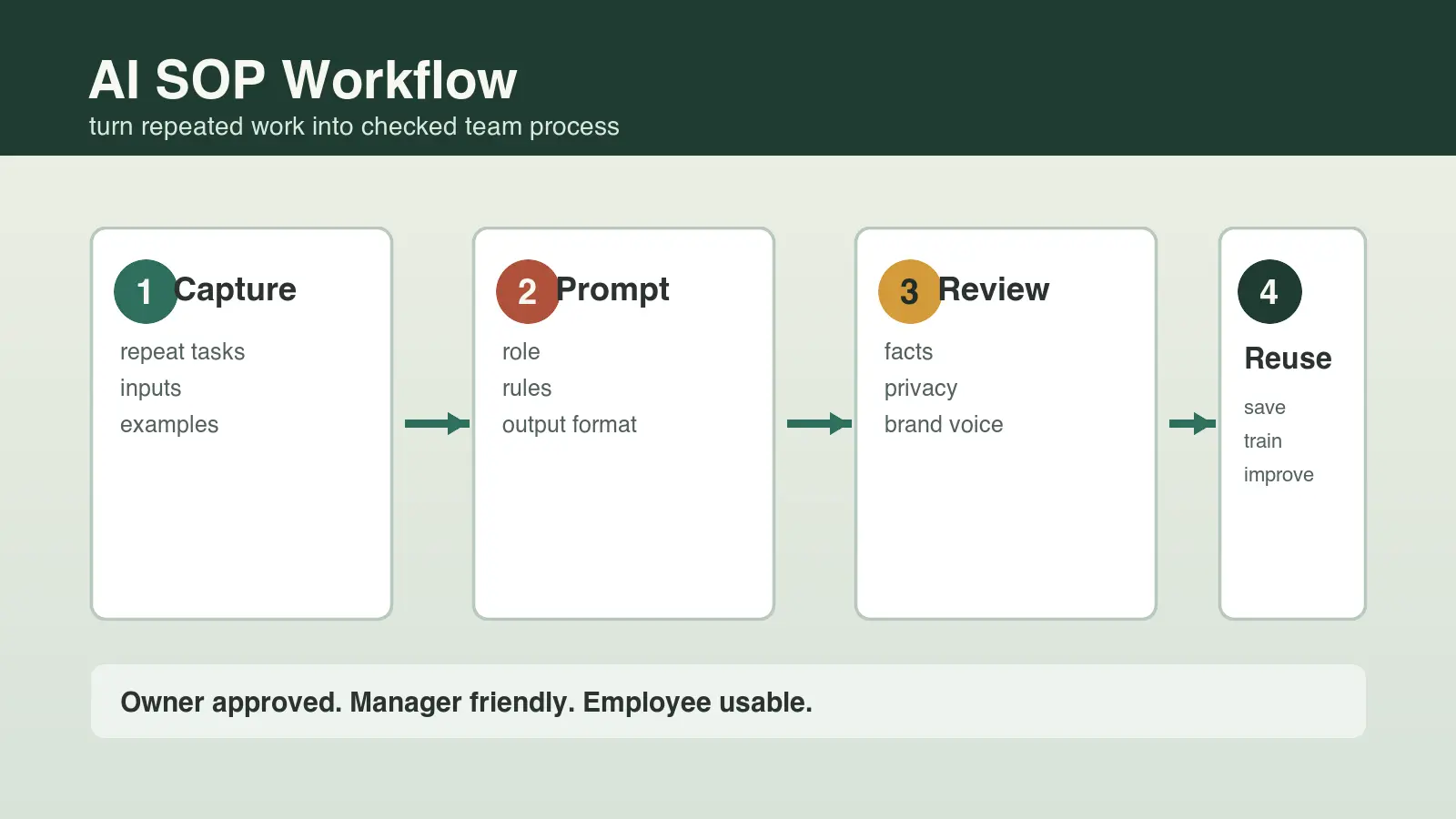
An AI SOP for small business is a short standard operating procedure that tells an owner, employee, or manager when to use AI, what information to provide, how to check the output, and what to save for next time. The goal is not to replace judgment. The goal is to turn repeated work like follow-up, customer replies, meeting notes, content drafts, quotes, and internal checklists into safer, faster, repeatable workflows.
What is an AI SOP for small business?
An AI SOP is a plain-English instruction sheet for using AI on one recurring business task. It defines the task, the approved inputs, the prompt pattern, the review steps, the approval rule, and the saved example that helps the next person do it better.
A normal SOP tells a person how to do a task. An AI SOP tells a person how to guide AI through the first draft, then how a human should judge, correct, approve, and improve the output. That human-in-the-loop step matters because AI can sound confident even when it is missing context.
Why do small businesses need AI SOPs?
Small businesses need AI SOPs because most AI waste comes from starting over every time. One employee writes a decent prompt, another gets a weak result, the owner fixes the work manually, and nobody saves the better process. An SOP captures the better way once so the whole team can reuse it.
- Owners get more consistent output without personally rewriting every draft.
- Managers can train employees on approved workflows instead of vague AI advice.
- Employees get a safer starting point and know when to ask for review.
- Local businesses can respond faster to leads, reviews, messages, and customer questions.
- B2B and online teams can create campaign drafts, proposals, reports, and follow-up with fewer blank-page delays.
Which tasks should become AI SOPs first?
The best first AI SOPs are repeated, text-heavy tasks where a person can quickly check the draft. Avoid starting with high-risk decisions, private customer details, legal conclusions, medical advice, financial promises, hiring decisions, or anything the business would not be comfortable reviewing carefully.
A strong next SOP is a human-reviewed AI customer onboarding process that turns verified sales details into a welcome, checklist, kickoff plan, and accountable handoff.
Good first AI SOPs for local businesses
- Missed-call follow-up text or email drafts.
- Review response drafts for positive, neutral, and negative reviews.
- Local service page outlines for one city, service, or customer problem.
- Appointment reminder messages and no-show follow-up drafts.
- Customer FAQ updates based on repeated questions.
Good first AI SOPs for B2B and online businesses
- Sales-call summaries with next steps and objections.
- Proposal first drafts from an approved discovery-note format.
- Email campaign outlines from one offer or webinar topic.
- Customer success check-in drafts based on account notes.
- Content briefs for comparison pages, case studies, and authority articles.
Good first AI SOPs for employees and managers
- Meeting notes turned into decisions, owners, and due dates.
- Manager updates turned into cleaner weekly summaries.
- Internal checklist drafts from a messy process explanation.
- Customer message drafts that match the company tone.
- Training notes turned into a repeatable onboarding outline.
What should every AI SOP include?
Every AI SOP should be short enough for a busy person to use while still clear enough to prevent careless output. NIST AI risk guidance emphasizes governance, measurement, management, and mapping context; in small-business language, that means the team should know the task, the risk, the review step, and the person responsible before AI output goes public.
- Task name: the exact recurring job this SOP covers.
- When to use it: the trigger that tells the team this workflow applies.
- Allowed inputs: what information can be shared with the AI tool.
- Blocked inputs: private, sensitive, regulated, or unnecessary information that should not be pasted into the tool.
- Prompt pattern: the reusable instruction that tells AI the role, context, constraints, tone, and output format.
- Review checklist: the facts, tone, privacy, policy, and brand standards a person must check.
- Approval rule: who can publish, send, or use the output.
- Saved examples: one or two approved outputs that teach the next draft what good looks like.
How do you write an AI SOP in 30 minutes?
You can write a useful first AI SOP in 30 minutes by choosing one repeated task and documenting the draft-and-review process. Do not try to write a company-wide AI manual first. Pick one task the business already does every week.
- Choose one repeated task that wastes time or creates inconsistent output.
- Collect two real examples of the input and one example of a good final output.
- Write the goal in one sentence, such as draft a friendly missed-call follow-up in under 100 words.
- List the information AI is allowed to use and the information it should never receive.
- Create a reusable prompt with role, audience, business context, tone, constraints, and output format.
- Add a five-point human review checklist for facts, privacy, tone, promise, and next step.
- Save the SOP where the team can find it, then improve it after three real uses.
AI SOP example for a missed lead follow-up
Here is a simple example a local service business could adapt. The task is to draft a same-day follow-up message when a prospect called, filled out a form, or asked for a quote but has not booked yet.
A reusable prompt pattern for SOPs
You are helping a local service business follow up with a new lead. Draft a warm, concise message that thanks the person, confirms the requested service, invites the next step, and does not make promises about pricing or availability. Use this business tone: helpful, direct, professional, and not pushy. Keep the message under 90 words.
A human review checklist before publishing
- Does the message match the actual service the person requested?
- Does it avoid private notes, pricing promises, or unsupported claims?
- Does it sound like the business, not a generic bot?
- Does it include one clear next step?
- Would the owner or manager be comfortable if the customer forwarded it?
What AI SOP mistakes should owners and managers avoid?
The biggest mistake is treating an AI SOP like permission to stop thinking. The second biggest mistake is making the SOP so complicated that nobody uses it. Good AI SOPs are practical: short, specific, reviewed, and improved from real work.
- Do not paste unnecessary private data into AI tools just to get a better draft.
- Do not let AI publish customer-facing content without human review.
- Do not build SOPs around one trendy tool if the workflow itself is not clear.
- Do not ask employees to use AI without giving examples of approved output.
- Do not measure success only by speed; check accuracy, trust, tone, and customer outcome.
- Do not leave old prompts floating around after the team learns a better way.
The FTC has warned businesses against deceptive AI claims and fake or misleading endorsements. For a small business, the practical lesson is simple: AI can draft, summarize, and organize, but the business is still responsible for what it says, sells, promises, and publishes.
How Winning With AI helps teams turn prompts into SOPs
Winning With AI teaches AI as a practical business workflow, not as a pile of random prompts. That matters because owners, employees, and managers usually understand AI faster when they see one real task move from messy input to useful draft to human-approved output.
At a live Winning With AI seminar, the point is to help business people see repeatable patterns: how to brief AI, how to review output, how to protect trust, and how to reuse the best version next time. That is exactly how AI becomes a useful SOP instead of another tab nobody uses consistently.
What else do people ask about AI and SOPs?
Is an AI SOP the same as an AI policy?
No. An AI policy sets company-wide rules for responsible AI use. An AI SOP explains how to use AI for one specific repeated task, such as drafting follow-up messages or summarizing meetings.
Who should own AI SOPs in a small business?
The owner, manager, or team lead should own the SOP library. Employees can improve the examples, but someone responsible for quality should approve the workflow before it becomes a team standard.
How many AI SOPs should a business start with?
Start with one to three AI SOPs. Choose tasks the team repeats often, where a better first draft would save time, and where human review is easy.
Can employees use AI SOPs without being technical?
Yes. A good AI SOP should be plain enough for a nontechnical employee to follow. It should explain the task, approved input, prompt, review checklist, and approval step in everyday language.
Where can I learn practical AI SOPs live?
Winning With AI is built for business owners, employees, and managers who want to see practical AI workflows demonstrated live. Visit WinningWithAI.com and choose a local seminar near you.
Choose the right process first with an AI workflow audit for small business, store approved answers in a small-business AI knowledge base, and apply the same controls when creating AI-assisted estimates and proposals. The Winning With AI program curriculum provides a broader operational framework.